 Jeremy Neely
Text Jeremy
Jeremy Neely
Text Jeremy
AI & Agents · Production
AME MCP Server
One governed doorway between AI assistants and business systems.
Built for: The AME Group, the managed IT provider I work for, plus client-facing deployments for a truck dealer and an AI tips service
The problem
AI assistants are only useful if they can read real data such as customers, units and tickets. The easy way is to paste a business system's API key into the AI platform, which leaves a credential in a third-party system, no record of what the AI asked for, and every integration breaking separately when a vendor changes its API.
What I built
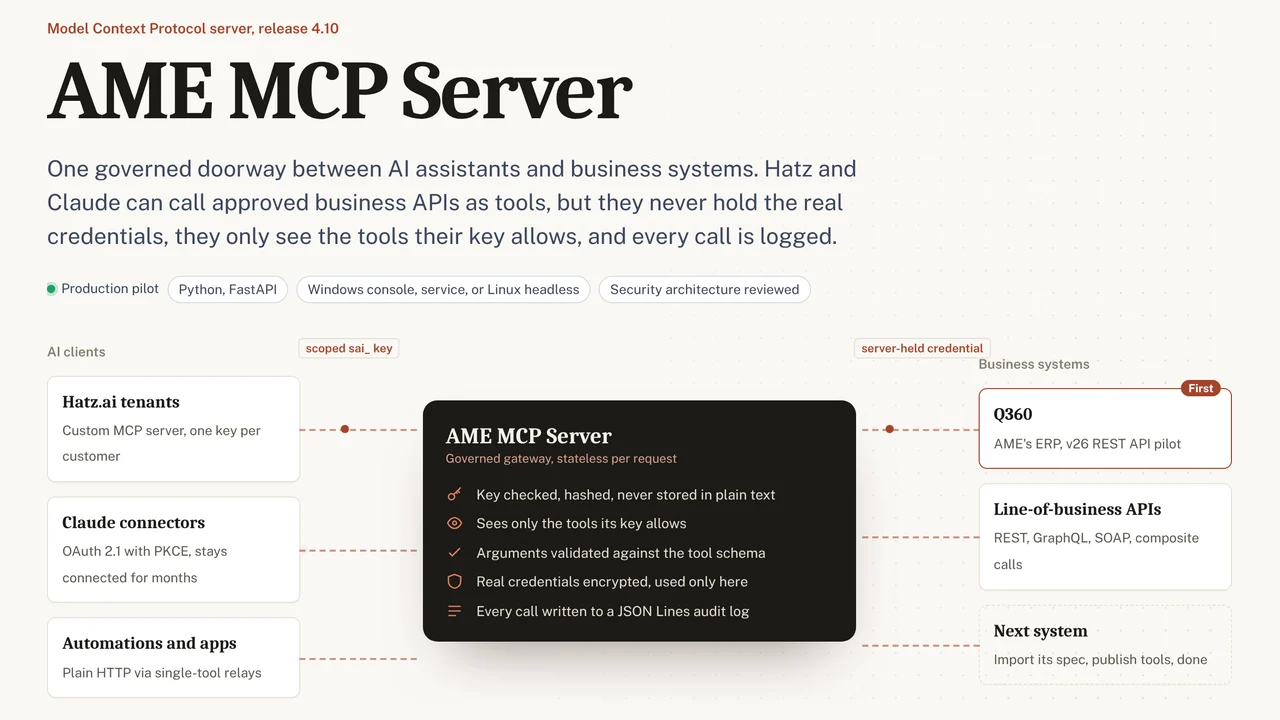
I built a Model Context Protocol server that sits in the middle. Each AI consumer gets a narrow key that only sees its own tools, the server holds the real credentials, and every call is logged. Tools are imported from OpenAPI, Postman, GraphQL, SOAP or cURL definitions, and the server is documented against a formal security architecture.
How it works
- Import a business API from its spec, or build a tool with the AI Tool Builder.
- Give each AI platform its own scoped key.
- The AI calls a tool; the server checks the key, validates the arguments and adds the real credential.
- The server calls the business system and returns only what the tool allows.
- Every call is written to a structured audit log.
Built with
- Python
- FastAPI
- Model Context Protocol
- OAuth 2.1 / PKCE
- pydantic
- pytest
More of Jeremy's work
Web Apps & Dashboards
Security & Compliance
Documents & OCR
- OCR WatchReads handwritten parts sheets on the PC and flags only uncertain entries.
- AME-XDOCMoves hundreds of Word documents to a new template, and checks itself.
- Meeting Executive Summary EmailA 30-second meeting summary page, with the detail one click away.
- OCR Review StudioUpload a scan, check OCR line by line, tune it, export Markdown.
AI & Agents
- CAD Drawing IndexLets staff ask their AI assistant what is inside AutoCAD drawings.
- Secure AI Hatz TipsFact-checked how-to answers inside the AI chat customers already use.
- Hatz User WatchWarns admins before any person runs out of AI credits.
- AI Hours TrackerAI interviews staff and writes up each AI time-saving win for leadership.
- Meeting Summary BuilderTurns a Teams or Zoom transcript into a branded Word meeting summary.
- Hatz Usage WatchTray app that tracks every Hatz AI client's monthly credit use and warns early.
- Secure AI for ExcelChat with any Hatz AI model inside Excel and let it do the work.
- TokenXMeasures what each Hatz AI model really costs, then helps people choose.
- FollowUp AITracks sent emails still waiting on a reply and helps close them.
- localzeroInbox-zero triage for Outlook Classic, run locally with Claude.
- Secure AI Advanced ChatSaved-prompt workspaces for Claude through the Hatz AI gateway.
- Hatz Admin ToolkitAdmin tools for moving users and bulk-assigning roles in Hatz AI.
- Secure AI Process MapThe 90-day Secure AI onboarding program on one clickable page.
Desktop Apps
- MDViewA portable Markdown reader and editor for Windows, one file, no install.
- CommCentralTeams, Outlook, calendar, inbox KPIs and an AI assistant in one window.
- N-ToolsOne portable Windows toolkit to diagnose, repair and document a PC.
- TicketNotesTime tracker that drafts Q360 timebill notes with AI.
- Activity LogRecords your workday and turns any time range into a ticket write-up.
- PriorityNotifyVIP emails and Teams chats that break through meetings and mute.
- MeetingRemindMeeting reminders that check you actually joined the call.
- MyDashA self-building launcher for every tool in a scripts folder.
- AppWatcherKeeps important tray apps running and alerts when they keep failing.